
This guide shows you how to interpret profit metrics on BettaMax — by day via Store Performance and by individual order. Understanding these metrics helps you assess operational efficiency and adjust your strategy accordingly.
Note: The feature to view daily Profit only applies to Join Fulfill sellers, i.e., sellers using BettaMax’s fulfillment system. Self-Fulfill sellers will not see the Store Performance section in the sidebar.
View total profit by day #
Store Performance displays a summary of business metrics over your chosen time period. Follow these steps to view your profit for the day or the period.
- From the sidebar, select Performance > Store Performance .
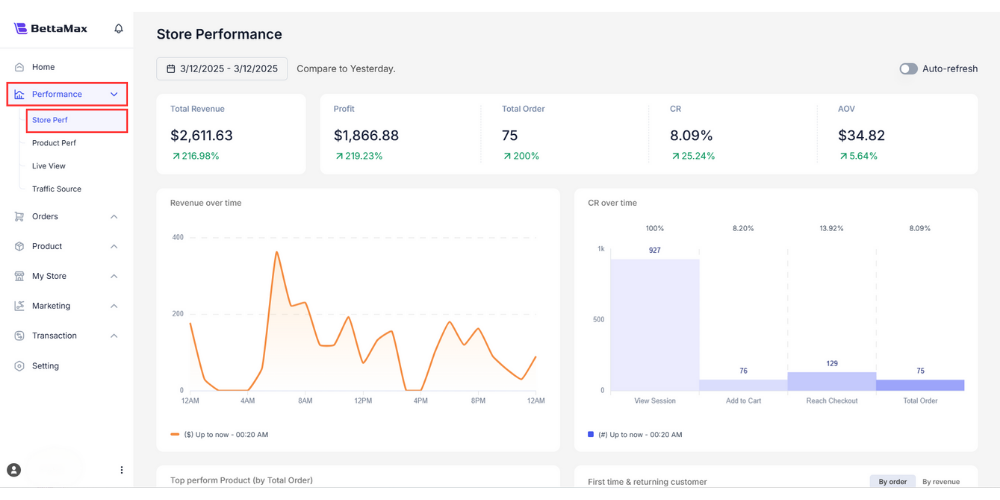
- Read the indicators on the dashboard:
- Total Revenue : Total revenue, including shipping fees collected from customers.
- Profit : Actual income after deducting all expenses (fulfillment, payment gateway fees, discounts).
- Orders : Total number of orders in the period being viewed.
- Conversion Rate : The percentage of website visitors who are converted into orders.
- AOV (Average Order Value) : Average order value.
- Adjust the time frame using the Today / Last 7 Days / Last 30 Days / Custom filters in the upper right corner of the dashboard.
Tip: Monitor Profit daily instead of just looking at Revenue . High Revenue but low Profit often signals that fulfillment costs or advertising expenses are too high relative to the profit margin.
View profit by order #
In addition to a daily overview, you can view detailed profit information for each specific order. This feature is available to all sellers, including Self-Fulfill sellers.
- From the sidebar, select Order > All Orders .
- Find the order you want to view, then click the eye icon (view details) in the Order ID column .
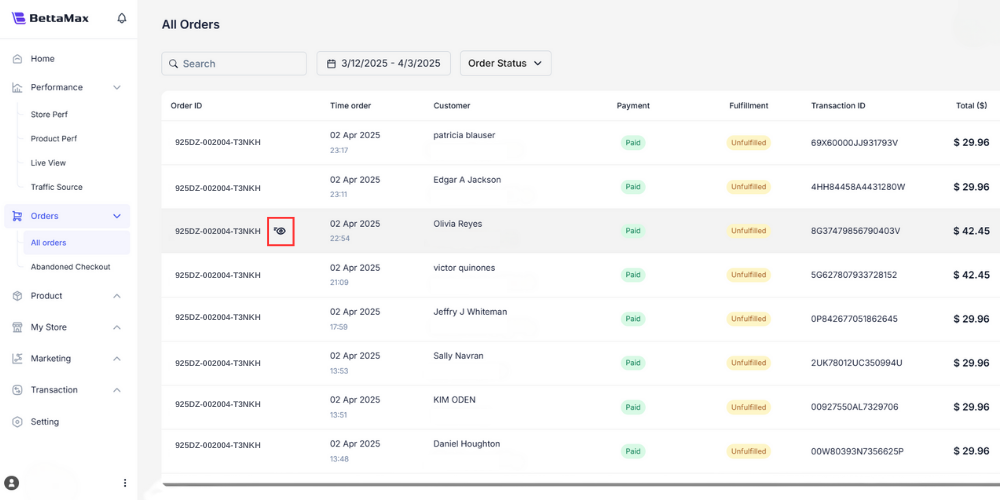
- On the order details page, read the total cost summary at the bottom:
- Subtotal : The product price before adding shipping fees and deducting any discounts.
- Shipping fee : The shipping fee is collected from the customer.
- Fulfillment Cost : The total cost you pay for BettaMax, including the product price and fulfillment fee.
- Discount : The discount applied to the order, if any.
- Profit : The actual profit from this order.

Tip: Quick formula: Profit = (Subtotal + Shipping fee) – Fulfillment Cost – Discount . If the profit is negative on an order, check the selling price in the Variants section to see if it covers the Fulfillment Cost .